
Task queue
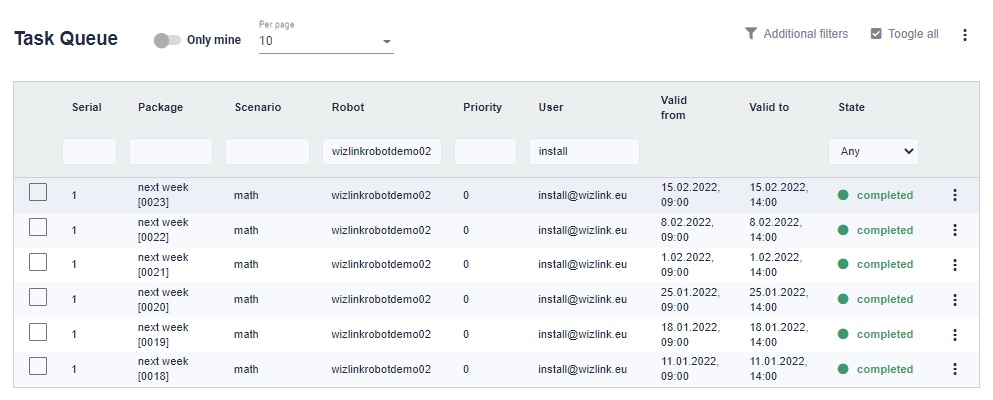
Tasks are an actual representation of the work to be done by the robots. They are made on the basis of scenarios.
On the screen, we can see a table with tasks. There is a checkbox next to each task, which allows you to select each task separately (or all by clicking the Toggle all button) and select an action for the selected tasks. You can also filter specific tasks based on expiration dates or table headers.
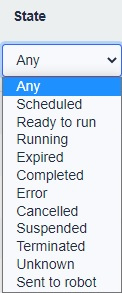
Any - all of the available states
Scheduled - vaiting for validity peroid
Ready to run - task is waiting for idle robot
Running - task is processed by robot
Expired - execution didn't start before valid to date
Completed - completed successfully
Error - error happend during execution. Go to details for more information
Cancelled - cancelled before start
Suspended - suspended by user
Terminated - forcibly terminated by user during execution
Unknown - something strenge happend (propably connection with robot lost)
Sent to robot - the task has been assigned to a robot
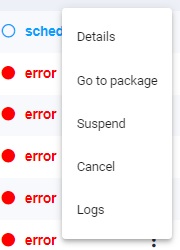
Details - Go to task details
Go to package - Go to the package details to which this task belongs
Suspend - Suspend / unsuspend the task
Cancel - Cancel the job before starting
Logs - Go to the logs related to this task